



Why these twenty
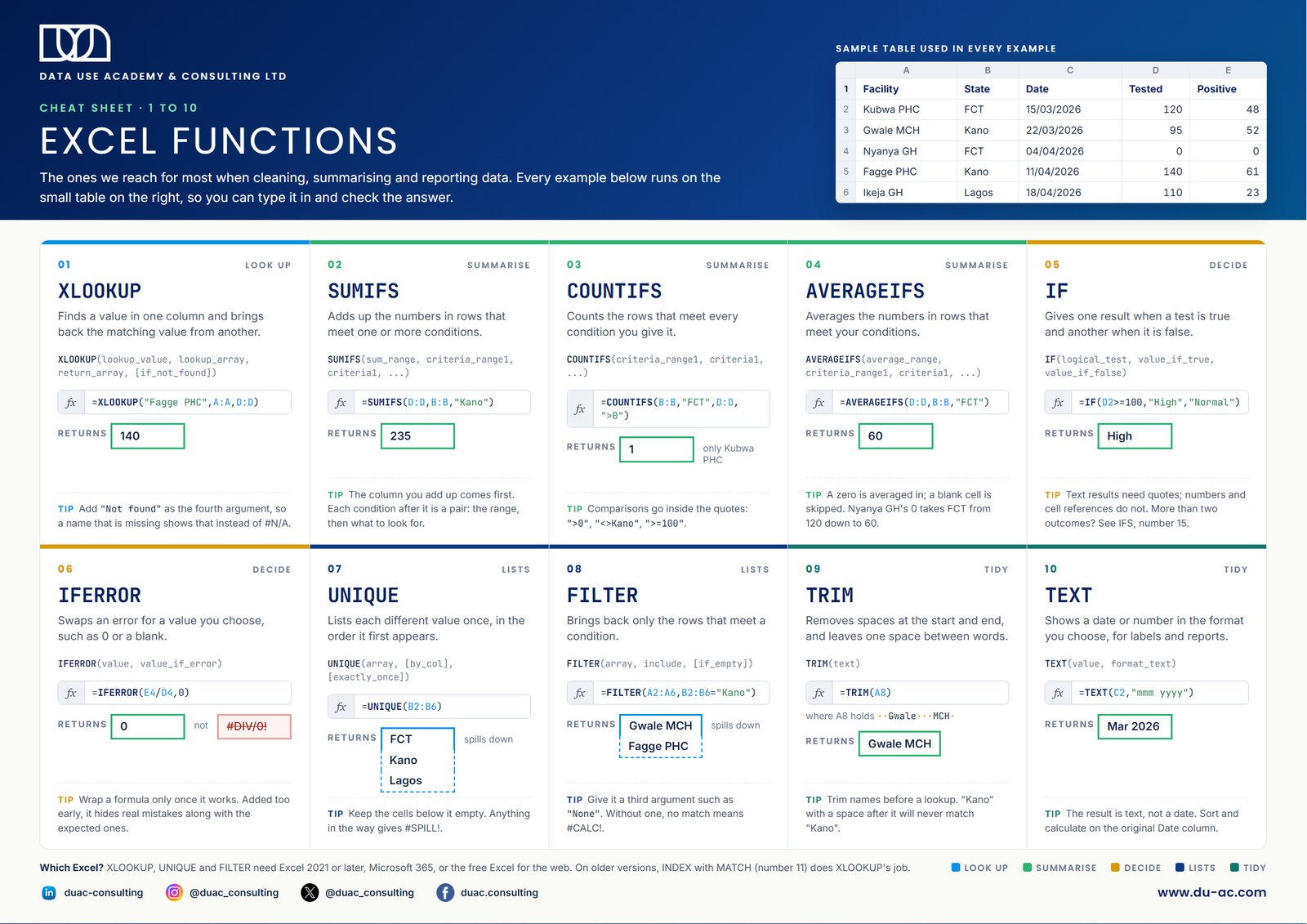
Excel has more than 400 functions. In everyday work with programme, survey or facility data, a small handful of them does most of the work: bringing a value across from another table, adding up or counting what meets a condition, flagging rows that need attention, and tidying text and dates so that everything else behaves.
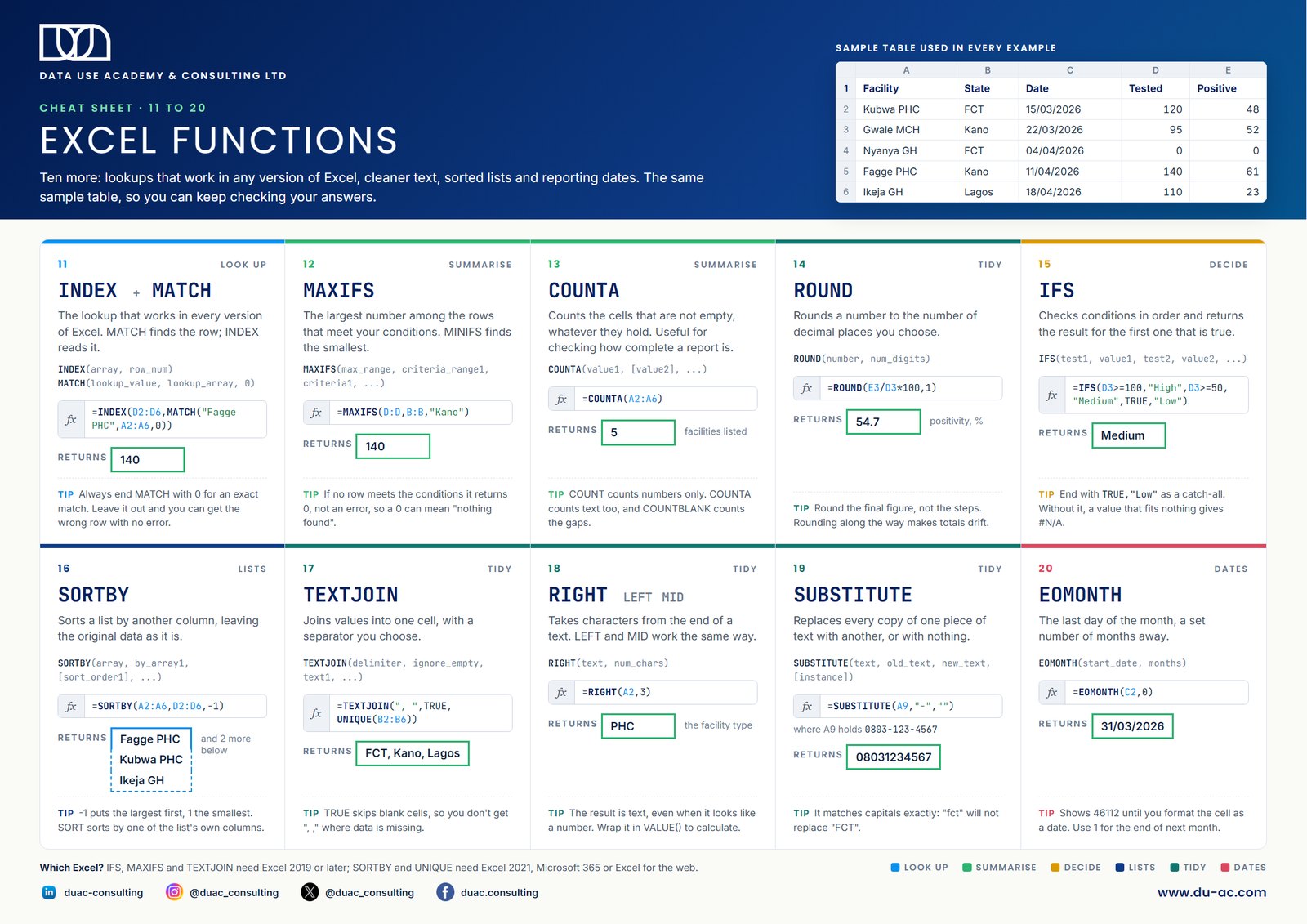
This two-page sheet covers the twenty we teach first and reach for most. Page one has the ten you will use every week. Page two adds ten more: a lookup that works in any version of Excel, cleaner text, sorted lists and reporting dates. Each one comes with its syntax, a worked example and the mistake people most often make with it.
How to use the sheet
Every example runs on the same small table of five health facilities: the facility name, its state, a date, the number tested and the number positive. Type that table into a blank workbook, copy each formula, and check that you get the answer the sheet shows. Ten minutes of doing this will teach you more than an hour of reading about it.
Then print both pages and keep them beside your screen. The goal is to stop needing them.
The twenty functions at a glance
Page one
- XLOOKUP: finds a value in one column and brings back the matching value from another.
- SUMIFS: adds up the numbers in rows that meet one or more conditions.
- COUNTIFS: counts the rows that meet every condition you set.
- AVERAGEIFS: averages the numbers that meet your conditions. Zeros are included; blank cells are not.
- IF: gives one result when a test is true and another when it is false.
- IFERROR: swaps an error such as #DIV/0! for a value you choose.
- UNIQUE: lists each different value once.
- FILTER: brings back only the rows that meet a condition.
- TRIM: removes the extra spaces that quietly stop lookups from matching.
- TEXT: turns a date into a label such as "Mar 2026" for reports.
Page two
- INDEX and MATCH: the lookup that works in every version of Excel.
- MAXIFS: the largest number among rows that meet your conditions. MINIFS finds the smallest.
- COUNTA: counts cells that are not empty, a quick check on how complete a report is.
- ROUND: rounds a figure to the decimal places you choose.
- IFS: checks several conditions in order, for more than two outcomes.
- SORTBY: sorts a list by another column without touching the original data.
- TEXTJOIN: joins values into one cell with a separator you choose.
- RIGHT, LEFT and MID: take characters from the end, start or middle of a text.
- SUBSTITUTE: replaces one piece of text with another, such as removing the dashes from a phone number.
- EOMONTH: the last day of a month, for reporting periods and deadlines.
If a lookup returns #N/A for a name you can see in the list, check for a stray space before anything else. A name typed as "Kano " will never match "Kano", and TRIM fixes it in seconds.
A note on Excel versions
XLOOKUP, UNIQUE, FILTER and SORTBY need Excel 2021 or later, Microsoft 365, or Excel for the web. IFS, MAXIFS and TEXTJOIN need Excel 2019 or later. If you do not have Excel installed, our short video shows how to use Excel for free in your browser. On older versions of Excel, INDEX with MATCH does the same job as XLOOKUP, and the rest of the sheet works as shown.
Download the cheat sheet
Both pages are below. Click either one to open the PDF, or use the button to save it.